Enterprise Servers
Mobile Workstation
Tower and Rack Workstation Series

DELL EMC PowerEdge Servers

HPE ProLiant Servers


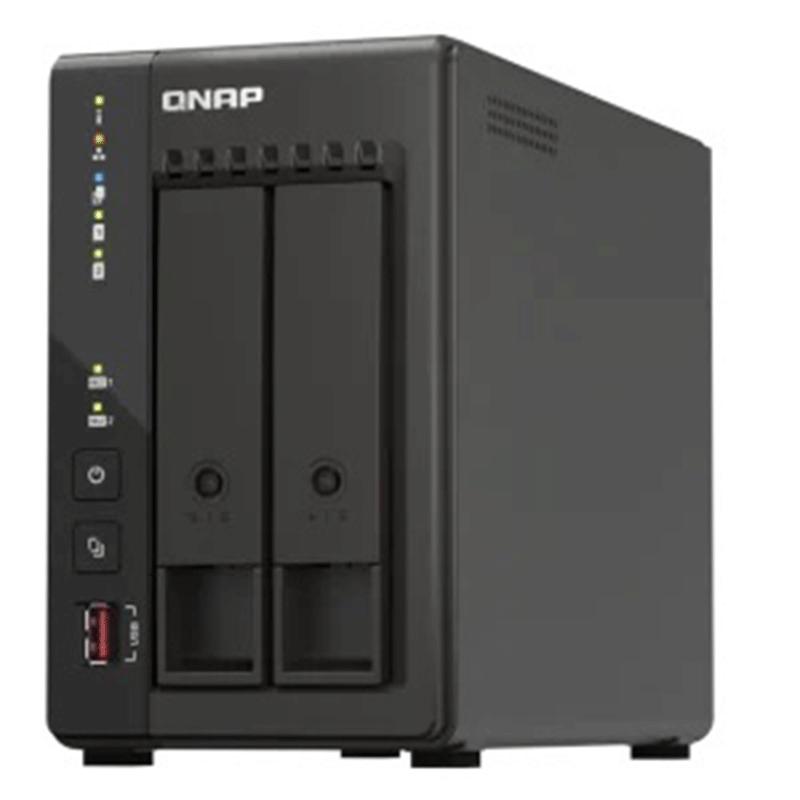
Hardware Summary

2.5 times faster network speed with existing CAT5e cables; supports port trunking to deliver up to 5Gbps.

Attain greater NAS performance by installing M.2 2280 NVMe PCIe SSDs (sold separately) or Edge TPU.

System performance and multitasking is optimized with 8GB RAM.

The TS-x53E series will be available and supported by QNAP for an extended period, up to 2029.
Long-term availability
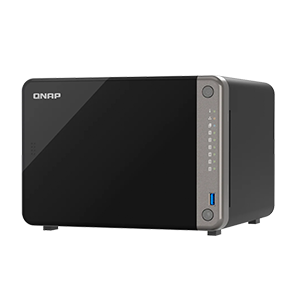
The TS-253E is powered by an Intel® Celeron® J6412 processor and will be available and supported for an extended period. This long-term availability making the TS-253E an ideal choice for MSP, SI, and other IT-related businesses requiring matching NAS models at multiple locations for long-term projects
24/7 surveillance solution for stores and branch offices
The TS-253E is a one-stop surveillance solution for centrally recording/managing multiple cameras and surveillance servers based in your offices, stores, and other working spaces
Upgrading your network shouldn’t break the bank, and 2.5GbE connectivity provides immediately noticeable improvements compared to standard 1GbE. QNAP offers 2.5GbE switches that supports Multi-Gigabit NBASE-T™ and allows you to use existing CAT5e cables to connect multiple computers and NAS, assisting organizations in implementing high-speed, secure and scalable network environments without going over budget.
The TS-253E supports various apps that cover all your backup needs. Practice safe IT habits by regularly backing up files and device content, allowing them to be easily restored when needed.
For Windows®, install NetBak Replicator to back up your PC to QNAP NAS. In macOS®, just set up the built-in Time Machine® to secure your data.
Hybrid Backup Sync makes it easy to back up data from a TS-253E to another QNAP NAS or remote server to fulfill your 3-2-1 backup strategy.
Enjoy license-free VMware® and Hyper-V VM backup with source-side incremental backup, global deduplication, and recovery compression.
Safeguard enterprise cloud data by backing up/syncing files, emails, calendars, and contacts from Google™ Workspace and Microsoft® Office 365® to the NAS.
Note: Minimum memory requirements are 2 GB available and 4 GB installed.
Hybrid Backup Sync supports mainstream cloud storage for NAS data backup. For backup to object cloud storage, VJBOD Cloud is especially useful to reduce bandwidth usage and backup time.
Hybrid Backup Sync eliminates redundant data at the source and then backs up the deduplicated data, helping to save time and storage costs while providing efficient multi-version backups.
Enjoy efficient WordPress backup/restore and site migration by leveraging the user-friendly Multi-Application Recovery Service (MARS), and easily batch backup WordPress files and database to the TS-253E with backup scheduling.
Take snapshots in seconds and revert the entire volume/LUN back to a specific point in time to prevent loss of important data.
Snapshot content can be quickly restored to a local NAS, or restored on a folder/file basis to a local/remote NAS or cloud storage. You can also conveniently view and restore snapshots from the client side.
Multiply data protection by backing up snapshot files! Replicate volume/LUN snapshots in the TS-253E to a remote NAS (Snapshot Replica) by copying only the changes made. This helps save time & bandwidth, and can be run manually or on a scheduled basis.
By running multiple virtual machines and containers on the TS-253E, you can deploy multi-tenant environments and applications to increase management efficiency and save hardware costs. Coupled with the Network & Virtual Switch app that boosts interoperability between virtual machines, containers, QNAP NAS, and other physical devices on the network, you can flexibly allocate physical and virtual network resources to simplify network deployment.
Run multiple Windows®, Linux®, UNIX®, Android™, and QuTScloud virtual machines and access them via a web browser or Virtual Network Computing (VNC). Businesses can run virtualized server applications on a single NAS without needing additional physical servers.
Experience Docker®, LXD, and Kata Containers lightweight virtualization technologies, download apps from the built-in Docker Hub Registry®, import/export containers, and create abundant microservices.
Run Linux® applications (including apps from the Software Center) directly on the NAS and remotely access the Linux® desktop from a web browser. The open-source Linux® platform is also ideal for Internet of Things development.
myQNAPcloud allows convenient connection to the TS-253E through the Internet without any complex DDNS settings. To ensure your remote access service is secure, myQNAPcloud strengthens keys on SSL Certificates to 2048-bits.
The TS-253E supports comprehensive access right settings for shared folders, Azure Active Directory Domain Services (Azure AD DS), LDAP, and Windows ACL to help IT staff efficiently manage user accounts and access rights for multiple NAS systems.
Supports IPv6, firewall access lists, and GeoIP filtering to restrict access based on geographical locations for higher NAS network security.
A virtual private network (VPN) allows secure access to network resources and services across public networks. QVPN supports creating a VPN client, using the TS-253E as a VPN server, and WireGuard® VPN service with an easy-to-use interface for setting up a secure connection.
To facilitate digital transformation, multi-site expansion and remote working, QuWAN SD-WAN helps automatically mesh multi-site VPN. It features IPsec encryption and cloud-centric management, allowing secure multi-site network including QNAP NAS and VMware ESXi platforms.
A security portal for the TS-253E to check for weaknesses and offer recommendations for enhancing NAS security. It also integrates anti-virus and anti-malware scanning software.
Regularly scan your TS-253E using the latest malware definitions. If infected files are detected, they will be immediately removed to ensure NAS data security.
TeamViewer app enables remote management and connectivity to multiple NAS devices from Windows® PCs with an unparalleled level of safety, while increasing IT efficiency and end user productivity.
The TS-253E integrates rich apps for storing, managing, synchronizing, searching, and archiving files. It supports SMB/CIFS, AFP, and NFS protocols for streamlined file sharing across Windows®, Mac®, and Linux®/UNIX®, and provides the smartest NAS solution for professionally managing your files.
Manage, access, and share all the files in the TS-253E and view snapshots files – all from your web browser. You can also easily mount remote NAS folders and cloud storage.
Make any file uploaded to a TS-253E available to linked devices, such as computers, laptops and mobile devices. You can sync shared folders and team folders for group file sharing to enhance the flexibility of team projects and collaboration.
QNAP’s powerful, Google-like search tool helps you quickly find images, music, videos, documents, and emails by keywords, color, and more search conditions. It also supports Qfiling to perform one-time or automatic archival tasks based on your search criteria.
Automate your file organization ─ all you need to do is categorize files, set a schedule, and Qfiling will do the rest. Qfiling also enables smart recycling that instantly moves filtered files to the Recycle Bin.


Reviews
There are no reviews yet.