Enterprise Servers
Mobile Workstation
Tower and Rack Workstation Series

DELL EMC PowerEdge Servers

HPE ProLiant Servers


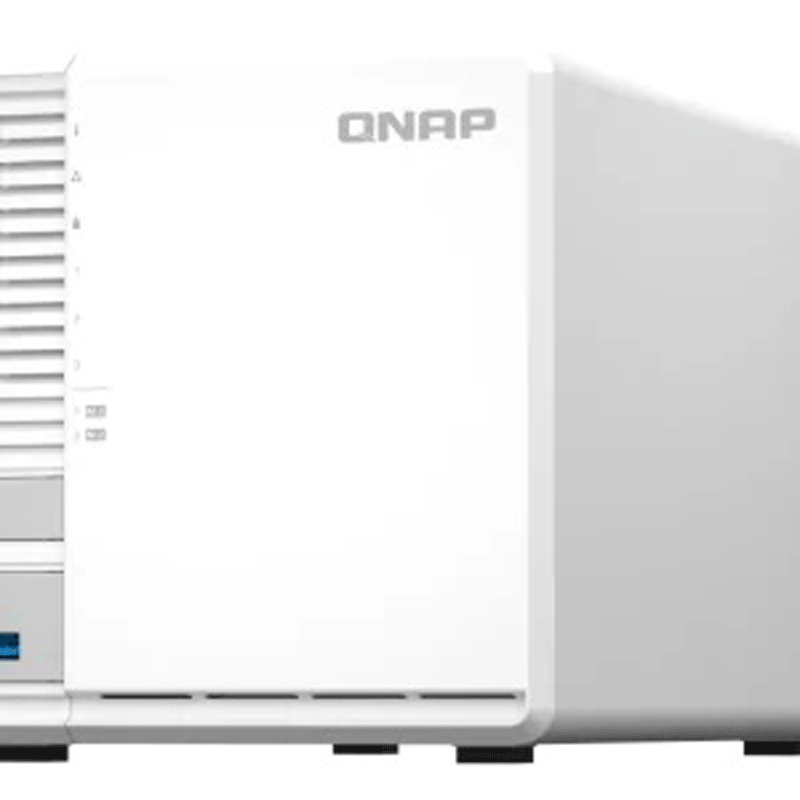
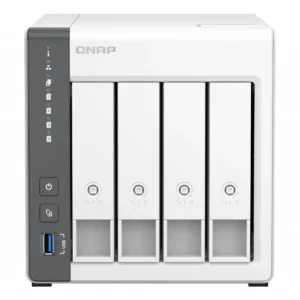
The TS-364 is designed for homes and small offices, allowing you to effortlessly manage files and enjoy multimedia entertainment while also providing reliable data protection. It uses an Intel® Celeron® N5105/N5095 quad-core processor (burst up to 2.9 GHz), has 3.5-inch SATA 3Gb/s and 6Gb/s drive bays, supports up to 16GB RAM, and AES 256-bit encryption (for both full NAS volumes and shared folders) protects the confidentiality of sensitive data without compromising performance. The TS-364 sports a stylish and elegant look with an industrial design concept. Effective airflow provides better cooling, ensuring smooth performance even under the heaviest loads. The tool-less 3.5-inch hard drive installation allows easier system setup and maintenance, while the front-panel LEDs assist in viewing system status.
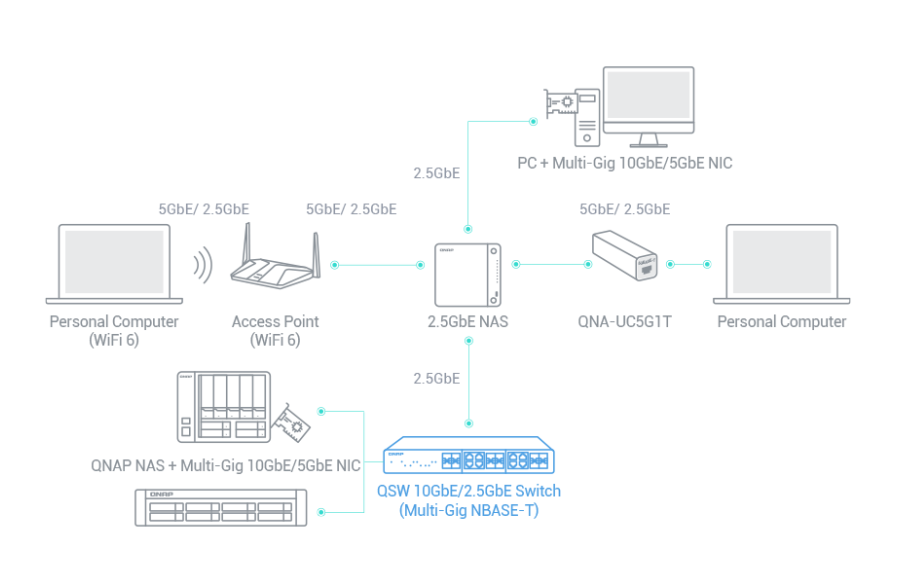
Immediately multiply file transfer speeds by 2.5 times while using existing CAT5e cables.
Dual M.2 PCIe Gen 3 slots enable cache acceleration or SSD storage pools for improved performance, or Edge TPU for AI image recognition.
Install a PCIe Gen3 x2 card to expand functionality, including a Multi-Gig 10GbE/5GbE/2.5GbE network card, a QM2 card, or a USB 3.2 Gen 2 (10Gbps) card.
4K H.264 hardware decoding and real-time transcoding for smooth big screen multimedia experience.
The TS-364 is designed for homes and small offices, allowing you to effortlessly manage files and enjoy multimedia entertainment while also providing reliable data protection. It uses an Intel® Celeron® N5095 quad-core processor (burst up to 2.9 GHz), has 3.5-inch SATA 3Gb/s and 6Gb/s drive bays, supports 8 GB DDR4 memory, and AES 256-bit encryption (for both full NAS volumes and shared folders) protects the confidentiality of sensitive data without compromising performance.
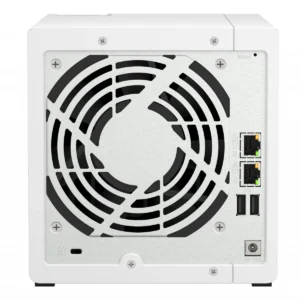
The TS-364 sports a stylish and elegant look with an industrial design concept. Effective airflow provides better cooling, ensuring smooth performance even under the heaviest workloads.
The tool-less 3.5-inch hard drive installation allows easier system setup and maintenance, while the front-panel LEDs assist in viewing system status.
The TS-364 is equipped with two M.2 PCIe Gen3 slots, enabling cache acceleration or SSD storage pools for improved performance, or Edge TPU for AI image recognition.

The TS-364 supports SSD caching and features two M.2 slots that support M.2 PCIe NVMe SSDs with 2280 form factors (sold separately) for boosting overall NAS performance. Qtier™ technology can also be used to empower the TS-364 with auto tiering that helps continuously optimize storage efficiency across all installed storage devices.
By leveraging a Google Edge TPU to QNAP AI Core (the AI-powered engine for image recognition), the TS-364 can perform high-speed face and object recognition. Google Edge TPU enables QuMagie to quickly process thousands of photos with high-speed AI Image recognition and classification, and QVR Face to analyze real-time video for instant facial recognition.
As SSD prices continue to become more affordable for home and small business users, there’s never been a better time for using SSDs in your NAS! With high speed and ultra-low latency, SSDs make everyday NAS use faster, more responsive, and enable faster backup, smoother multimedia, and optimized virtualization. QTS takes SSD functionality even further by supporting software-defined SSD RAID extra over-provisioning (OP), enabling you to allocate additional OP space (up to 60%) to optimize SSD random write speeds and lifespan. By using SSD OP, even affordable consumer-grade SSDs can attain performance and endurance levels similar to enterprise-grade SSDs.
QNAP offers comprehensive, budget-friendly storage and networking solutions that provide an array of connectivity possibilities. Easily and flexibly upgrade your workplace or home network now to handle bandwidth-hungry applications.
Featuring a 2.5GbE port, the TS-364 is futureproofed for high-speed networking.
Servers and desktops can install PCIe that support 10G/5G/2.5G/1G/100M Multi-Gig.
Laptops and upgrade-limited computers can use for connecting to 5G/2.5G/1G/100M networks.
support 10G/5G/2.5G/1G/100M and allow connecting multiple workstations and devices for high-speed collaboration in device-dense environments.
With two USB 3.2 Gen 2 (10Gbps) ports and one USB 3.2 Gen 1 (5Gbps) ports, you can quickly backup and transfer large files to/from the TS-364. You can also connect mobile phones, UPS, printers and other compatible USB devices for greater functionality and application potential.
With integrated Intel® OpenVINO AI computing resources, the TS-364 accelerates AI image recognition performance without impacting other applications or services. QNAP AI Core primarily works with the QuMagie application.
Easy-to-use photo management solution that integrates AI image recognition and intelligent classification for your collection.
With GPU acceleration
% Performance boost
The TS-364 comes with the QTS 5 operating system as standard, providing a next-generation usage experience with an updated system kernel, optimized user interface, and advanced security features.
When navigating QTS 5, you will notice a finer attention to detail for a superior browsing experience. Enjoy a smoother NAS experience, comfortable visual design, and find your favorite apps quicker.
When performing first-time installation, the notice board guides you through the setup process. Simply follow the step-by-step instructions for a quick and easy setup.
Whether clicking buttons, switching between apps, expanding/collapsing windows every action is much smoother. The search bar in the main menu also assists in quickly finding desired apps.
The TS-364 can be used with QNAP KoiMeeter to build a high-quality video conferencing system. With 4K output you can see every detail in screen shares, web browsers, and online meetings. Important files can be shared using the built-in chat room and video calls and messages can be recorded to the TS-364 for future playback or archiving.
The TS-364 can do many things, but at its heart is a complete backup solution to protect your files and data. By regularly backing up your files and device content, you can make data loss a thing of the past.
The TS-364 can do many things, but at its heart is a complete backup solution to protect your files and data. By regularly backing up your files and device content, you can make data loss a thing of the past.
For Windows®, install NetBak Replicator to back up your PC to the TS-364. In macOS®, simply set up the built-in Time Machine® to back up files to NAS.
Install Qfile or QuMagie mobile app and enable the “auto-upload” function. Photos will be automatically uploaded to your TS-364 as soon as they are taken.
Simply plug in the storage device to the front USB port of the TS-364 and press the One-Touch Copy button to back up all files to the NAS.
Hybrid Backup Sync can safely back up files and data from Google Drive to the TS-364, helping you save money on cloud storage costs.
Hybrid Backup Sync supports all your favorite public cloud services, allowing you to effortlessly back up or sync NAS files to cloud storage.
Hybrid Backup Sync eliminates redundant data at the source and then backs up the deduplicated data, helping to save time and storage costs while providing efficient multi-version backups.
With Hybrid Backup Sync, you can easily backup or sync files and data from the TS-364 to a remote QNAP NAS or server for multiplied data protection.
QNAP provides snapshots as standard for all NAS – including the TS-364. Snapshots work by recording the current state of the system, allowing it to be restored back. This state at any time – greatly helping in mitigating the threat of ransomware.
Always remember to back up. You should automatically back up files and data from your computer to your TS-364.
High-resolution RAW files eat up phone storage so quickly. Whether you are a photographer enthusiastic, YouTuber, or professional photo or video editors, use the TS-364 with high-capacity hard drives to alleviate your storage anxiety and organize files efficiently as the best storage center.
RAID redundancy protects data against hard drive failure. By dedicating some drives to redundancy, if a drive fails you can simply replace it with a new drive and avoid data loss.
The AI-powered QuMagie with intelligent face and object recognition brings you the ultimate photo management and sharing solution. Includes timeline scrolling, customizable folder covers, iOS® Live Photo display, a powerful search tool, and more.
Use Music Station to collect and play lossless music, sing along with lyrics, and share albums, playlists or folders with friends and family. You can also put tons of music right in your pocket using the Qmusic mobile app.
Centrally collect GoPro diaries, videos of your family, friends, and pets in Video Station, and easily share your favorites. Take all your videos with you on your mobile devices using the Qvideo mobile app.
QNAP provides easy and affordable solutions to expand your NAS storage capacity.
Connect expansion enclosures to the TS-364, and manage NAS storage expansion with the user-friendly Storage & Snapshots Manager app.
Mount cloud storage or remote file servers to expand the capacity of the TS-364 while also centrally managing files on the NAS, cloud storage, and remote devices.
Install your NAS hard drives into a larger QNAP NAS and retain all your existing data and configurations.
Hot-swap lower-capacity drives with larger-capacity drives to expand your NAS capacity so it can grow with your files and multimedia collections.
Hard drives are at the heart of your NAS, and ensuring their long-term health and reliability is absolutely crucial. QNAP provides various methods and tools to help you monitor hard drive health, ensuring that you can take proactive decisions to safeguard your data and files.
If any of the S.M.A.R.T. values are reported as abnormal, or bad blocks are detected, you can take early action and replace drives before potential data loss occurs.
The DA Drive Analyzer leverages ULINK cloud-based AI to predict the expected lifespan of drives, assisting you in planning future drive replacements to protect against NAS downtime and data loss.
When using supported IronWolf™ or IronWolf Pro™ hard drives, overall system reliability is improved by providing you with actionable prevention, intervention, and recovery options.
The TS-364 is backed by a 2-year warranty at no additional cost. You can also purchase a warranty extension that extends your warranty coverage up to 5 years.


Reviews
There are no reviews yet.