Enterprise Servers
Mobile Workstation
Tower and Rack Workstation Series

DELL EMC PowerEdge Servers

HPE ProLiant Servers


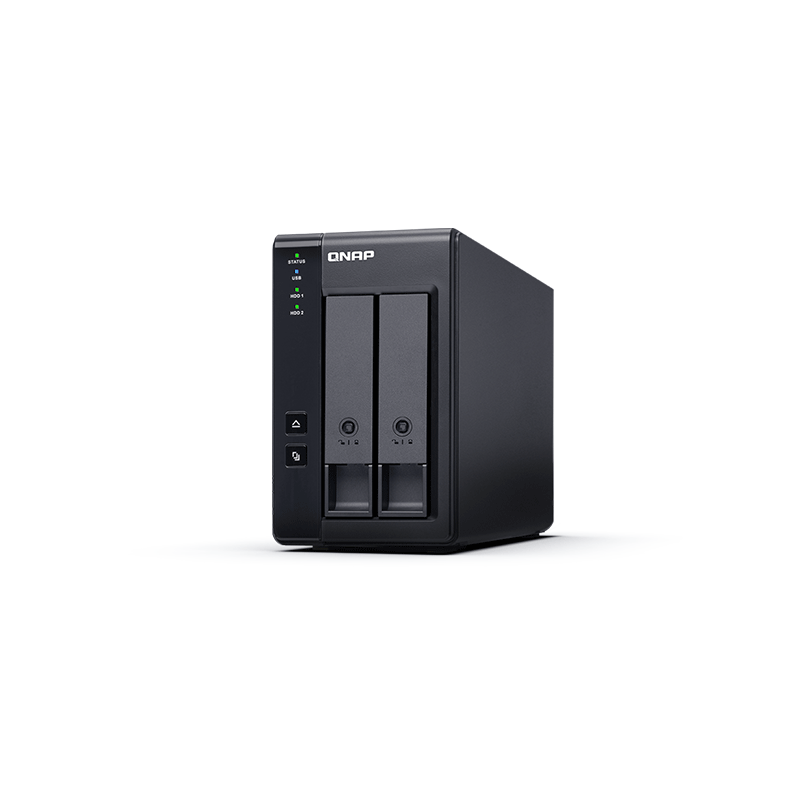
The QNAP TR-002 2-Bay Network Attached NAS Storage Expansion Module Enclosure allows you to expand the capacity of your QNAP NAS and PC. The TR-002 can also be utilised as a DAS (Direct-attached Storage) device, allowing you to directly access its content just by connecting it via USB. The TR-002 features two 3.5-inch SATA drive bays with USB 3.1 Gen. 2 Type-C connectivity to bring you a highly-reliable and secure storage capacity expansion solution.
The TR-002 is an ideal storage expansion solution for PCs, especially for laptops which lack the ability to install higher-capacity drives. Featuring two 3.5-inch SATA drive bays and supporting RAID configuration, it provide the ability to store a vast number of files and data and to ensure protection against potential drive failure.

The TR-002 supports various RAID configurations depending on your requirements. Users can switch between hardware- or software-controlled RAID modes. Move the DIP switches to corresponding positions for your ideal RAID mode: Individual, JBOD, RAID 0 or RAID 1. You can also configure the RAID settings from your QNAP NAS, or by using the QNAP External RAID Manager utility on your computer.
Compared with other RAID enclosures, the TR-002 provides software-controlled configurations for greater management flexibility. Users can configure RAID and monitor disk health using Storage & Snapshots Manager on a QNAP NAS, or by using the QNAP External RAID Manager utility on their computer.
The TR-002 meets many storage expansion requirements for home and work use, including:
The TR-002 allows users to expand their NAS storage capacity. By connecting the TR-002 to their NAS and using the Storage & Snapshots Manager, users can easily configure and manage their storage expansion. The TR-002 supports a variety of QNAP NAS storage and file management functions, allowing users to build storage pools, find files with Qsirch and organise files with Qfiling.
| Function | QNAP TR-002 | Other external RAID device |
|---|---|---|
| Connection Type | USB 3.1 Gen. 2 | By device |
| Drive bays | 2 | By device |
| Supported systems | QNAP QTS, Windows, macOS, Linux etc… | QNAP QTS, Windows, macOS, Linux etc… |
| Disk health monitoring | Supported (QTS, Windows, macOS) | Not Supported |
| Hardware RAID protection | Supported (QTS, Windows, macOS) | Varies by device |
| Expand Storage Pool | Supported (QTS, Windows, macOS) | Not Supported |
| RAID migration, capacity expansion | Not Supported | Varies by device |
Note:
Instead of using the TR-002 to expand the capacity of your QNAP NAS, you can use it as a complimentary storage unit for backing up or moving data. It also allows you to physically migrate huge data collections that would require significant network bandwidth. While connected to the NAS, you can monitor the health and status of the TR-002 by using the Storage & Snapshots Manager on the NAS.
The TR-002 can quickly add storage space to your computer. You can use the DIP switch to configure a hardware RAID mode or manage it by using the QNAP External RAID Manager utility. The health and status of the TR-002 can also be monitored by using the QNAP External RAID Manager utility.
From your NAS to Windows, Mac, and Linux computers, the TR-002 is compatible with a wide range of devices. This makes it ideal for quickly moving large files between different devices. The TR-002 is even compatible with devices that use the exFAT file system, adding further convenience for accessing and sharing files from a wider range of devices.
As an external hardware RAID device, the TR-002 operates independently and does not require additional NAS system resources. The TR-002 features USB 3.1 Gen.2 connection and supports SATA 6Gb/s drives for high-speed data access.


Reviews
There are no reviews yet.