Enterprise Servers
Mobile Workstation
Tower and Rack Workstation Series

DELL EMC PowerEdge Servers

HPE ProLiant Servers


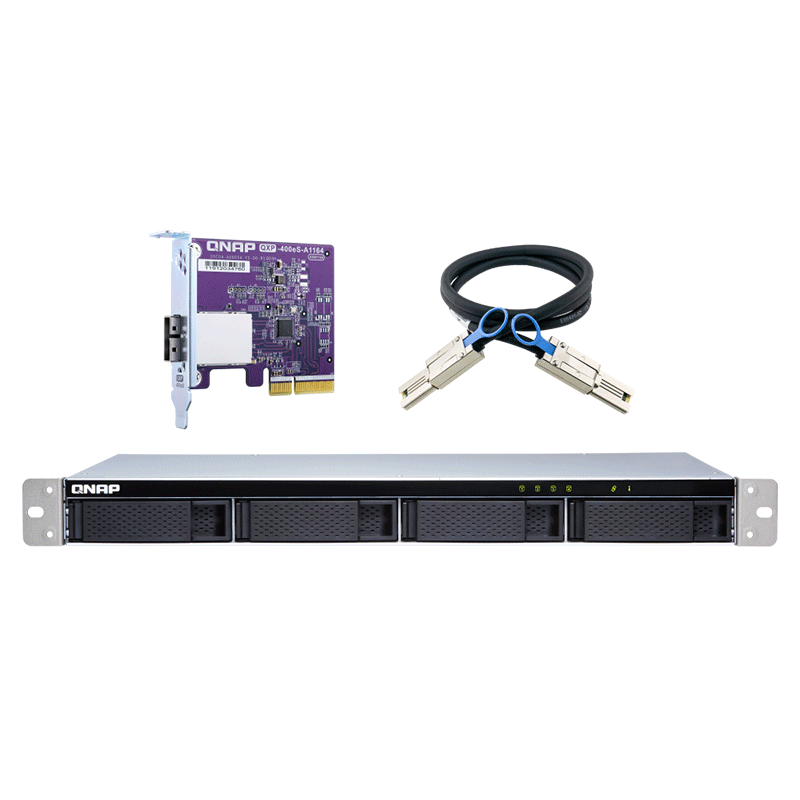
The QNAP TL-R400S 4-Bay Rackmount JBOD Network Attached NAS Storage Expansion Module Enclosure allows you to back up and expand your QNAP NAS, Windows® and Ubuntu® computers and servers. The TL-R400S features four 3.5-inch SATA 6Gb/s drive bays, the shallow rack design is perfect for installing the TL-R400S in a compact rack, or in areas with a lot of cabling. TL-R400S comes with a QXP PCIe card for connecting the enclosure using a SFF-8088 (or SFF-8644) cable. It provides reliable read/write performance for smooth storage and backup tasks.
High capacity & compatibility: High-capacity TL SATA JBOD can not only expand NAS storage, but also Windows® and Ubuntu® computers and servers.
High-speed connectivity: SFF-8088 (or SFF-8644) connection cable supports four SATA 6Gb/s channels per cable (24Gb/s in total) and provides faster data transfer speeds than eSATA and USB.
Short depth design: The short depth rackmount NAS is perfectly suited for installation in a compact rack, or places with a lot of cabling.
Back up and expand your QNAP NAS, computers, and servers. The TL-R400S features four 3.5-inch SATA 6Gb/s drive bays, and includes a QXP PCIe card for SFF-8088 (or SFF-8644) connectivity. Ensure reliable read/write performance for smooth storage and backup tasks.
The TL SATA JBOD supports multi-lane SATA 6Gb/s transfer, each SATA lane directly connects to a single SATA drive to help improve performance. With the 1-1 high-speed channel, the TL SATA JBOD delivers excellent transfer performance.
The TL-R400S provides software-controlled storage configuration for greater management flexibility. When connected to a QTS or QuTS hero NAS, or with the QNAP JBOD Manager utility when connected to a computer you can configure RAID and monitor JBOD enclosure and disk health with Storage & Snapshots.

Use the Storage & Snapshots Manager in QTS or QuTS hero to configure the TL-R400S as a storage enclosure for your QNAP NAS. The NAS expansion storage mode supports various NAS functions, including storage pools and snapshots. With TL-R400S, you can easily expand storage capacity.

The QNAP JBOD Manager is a desktop utility for monitoring the TL-R400S on Windows® and Ubuntu® computers. You can quickly obtain disk statuses, JBOD information and health, view fan rotation speed, and check for firmware version updates.
You can connect your TL-R400S to Windows and Ubuntu computers and servers through the SFF-8088 (or SFF-8644) high-speed cable and use built-in utility to manage the RAID configuration.
The QNAP JBOD Manager is a desktop utility for monitoring the TL-R400S on Windows and Ubuntu computers. You can quickly obtain the disk statuses, JBOD information and health, view fan rotation speed, and check for firmware version updates. All device events are recorded, and send desktop notifications when a system alert occurs.
Install an exclusive QXP PCIe card onto your QNAP NAS, Windows or Ubuntu PC and servers to connect the JBOD enclosure via SFF-8088 (or SFF-8644) cable, for easy and flexible storage expansion.


• For QXP-1600eS-A1164, QXP-1600eS PCIe SATA card
• Support SATA 6Gb/s and SAS 6Gb/s
• Compatible with third-party SAS 6Gb/s JBOD products

• For QXP-400eS-A1164 and QXP-800eS-A1164 PCIe SATA cards
• Support SATA 6Gb/s and SAS 6Gb/s
• Compatible with third-party SAS 6Gb/s JBOD products
Below is a list of potential application scenarios that helps to meet home and office storage expansion requirement
By connecting the TL-R400S to their NAS and using Storage & Snapshots Manager in QTS or QuTS hero, users can easily configure and manage their storage expansion. The TL-R400S supports a variety of QNAP NAS storage and file management functions, allowing users to build storage pools, finding files with Qsirch, and organizing files with Qfiling.
You can use the TL-R400S to expand your NAS storage. You can select disks to create storage pools for expanding your NAS capacity, or you can treat each disk as an individual external storage space and use it as a removable drive for greater flexibility. Regardless of the mode you use, you can always use Storage & Snapshots Manager in QTS or QuTS hero to set up and manage your TL-R400S and use hard drive S.M.A.R.T. and Notification Center to check disk status anytime and anywhere.
You can use Storage & Snapshots Manager in QTS or QuTS hero to configure the RAID storage pool for your TL-R400S and expand NAS capacity.
Note: The TL-R400S can only be used as an individual storage pool or volume on the NAS. Its storage pool or volume cannot be combined into the connected NAS. NAS applications cannot be installed on the TL-R400S.
You can set up the RAID configuration of your TL-R400S to further secure data protection. You can also use the single disk mode and format with exFAT file system for more convenient access and sharing of files between Windows® and Ubuntu® computers.
You can obtain data protection by building a software RAID 0, RAID 1, and RAID 5 volume with native utility in your Windows® and Ubuntu® computers, and use the QNAP JBOD Manager to monitor the TL-R400S status information.
You can format hard drives with the exFAT file system while accessing and sharing files between Windows® and Ubuntu® computers.
By installing third-party hardware RAID cards on your TL-R400S for advanced hardware RAID 1, RAID 5, RAID 6, RAID 10, RAID 50, and RAID 60 protection and use Windows® utility software to manage your TL-R400S.
| Function | MRAID | MegaRAID Storage Manager | Storage Manager | RAID Management |
| Brand | Areca | Broadcom | Microsemi | HighPoint |
| Model | ARC-1883x | MegaRAID SAS 9286-8e (6 Gb/s) MegaRAID SAS 9286-8e (12 Gb/s) |
SmartRAID 3154-8e | RocketRAID 3742A |
Note: The third-party hardware RAID card cannot be used simultaneously with QNAP JBOD manager and QXP series PCIe cards.
The TL-R400S features SFF-8088 (or SFF-8644) connectivity and multiple SATA 6Gb/s bays. This provides better sequential read performance and faster data transfer speeds than existing USB and eSATA expansion enclosures, while also being a more economical option compared to a QNAP REXP SAS enclosure.


Reviews
There are no reviews yet.