Enterprise Servers
Mobile Workstation
Tower and Rack Workstation Series

DELL EMC PowerEdge Servers

HPE ProLiant Servers


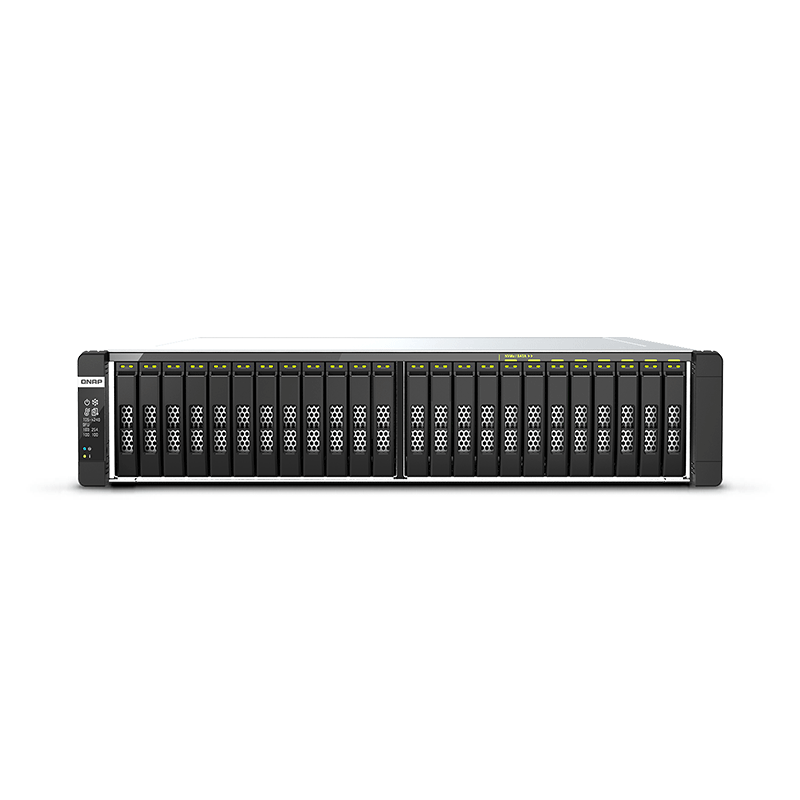
Dual-processor (2 x 8 Cores & 2 x 16 Cores) NVMe all-flash ZFS storage built for latency-sensitive file servers, virtualized workloads, and 4K/8K streams
(Supports QuTS hero or QTS operating system)Hybrid Storage Optimized for SSD Cache Accelaration: The hybrid storage of the TS-h2287XU-RP NAS enclosure balances cost, performance, and capacity. Featuring sixteen 3.5″ SATA III bays for hard drives and six 2.5″ SATA III SSD slots, the TS-h2287XU-RP supports SSD caching to boost IOPS performance.
Featuring dual Intel® Xeon® Silver 4300 processors and 24 U.2 NVMe Gen 4 x4 SSD bays, the QNAP’s flagship NVMe all-flash storage TDS-h2489FU delivers high random read/write IOPS for tackling I/O-intensive and latency-sensitive applications. The ZFS-based QuTS hero operating system supports inline data deduplication and compression for reducing I/O and SSD storage consumption, which significantly extends SSD lifespan with a higher price-performance ratio for all-flash storage arrays. Coupled with near-unlimited snapshots, real-time SnapSync, and QSAL (QNAP SSD Antiwear Leveling), the TDS-h2489FU meets your requirements for modern data centers, virtualization, and mission-critical backup/restore tasks.
Inline data deduplication and compression, Pool Over-provisioning, and TRIM maximize SSD performance and lifespan.
Dual 25GbE SFP28 and quad 2.5GbE RJ45 high-speed connectivity accelerates virtualization, intensive file access, and large backup/restoration tasks.
Allows for installing 10/25/40/100GbE adapters, QM2 cards, or Fibre Channel cards to increase application performance.
Supports virtualization storage and hosting virtual machines and containerized apps.
Realizes hybrid cloud applications by working with the cache space reserved on NAS to ensure low-latency data access to the cloud.
Scalable design to grow with your business by connecting SAS 12Gb/s expansion enclosures for up to petabyte-scale storage capacity.
QuTS hero’s self-healing ensures data integrity and reliability. Write Once, Read Many (WORM) is also supported.
Inline data deduplication, compression, and compaction reduce file sizes to conserve storage capacity and optimize performance.
Main memory read cache (L1 ARC), SSD second-level read cache (L2 ARC), and ZFS Intent Log (ZIL) for synchronous transactions with power failure protection are supported to boost performance and security.
Multiple RAID levels allow flexible capacity utilization. RAID Triple Parity and Triple Mirror deliver higher levels of data protection.
RAID-level SSD lifespan is automatically and regularly detected to prevent simultaneous SSD failure, improving your data protection and system reliability.
Apps for backup/sync, virtual machines/containers, content management, productivity, and more features can be used to expand the application potential of the NAS.
The TDS-h2489FU is powered by dual Intel® Xeon® Silver 4309Y 8-cores 2.8 GHz (up to 3.6 GHz) or Intel® Xeon® Silver 4314 16-cores 2.4 GHz (up to 3.4 GHz) processors, which are based on the new 3rd Gen Intel® Xeon® Scalable processors architecture that increases core performance, memory, I/O bandwidth, and features built-in workload and service acceleration. With 8-channel modules and 32 Long-DIMM slots, the TDS-h2489FU’s DDR4 memory can be upgraded up to 1 TB for fulfilling memory-intensive applications. Demonstrating immense computing power and multi-tasking capabilities, the TDS-h2489FU is outstanding for uncompromising performance demands in HPC, virtualization, file servers, and multimedia applications
Note: Minimum memory requirements are 2 GB available and 4 GB installed.
The TDS-h2489FU supports block-based snapshots that record the state of the system at any time. It helps protect data, which can be restored back to a specific point of time, greatly helping in mitigating the threat of ransomware.
QuTS hero supports enough snapshots for you to create 1 snapshot every hour for 7 years without needing to delete any! Copy-on-write technology makes snapshot creation almost instantaneous without affecting ongoing data writing.
Multiply data protection by backing up snapshot files! Replicate volume/LUN snapshots in the TDS-h2489FU to a remote NAS (Snapshot Replica) by copying only the changes made. This helps save time & bandwidth, and can be run manually or on a scheduled basis.
By running multiple virtual machines and containers on the TDS-h2489FU, you can deploy multi-tenant environments and applications to increase management efficiency and save hardware costs. Coupled with the Network & Virtual Switch app that boosts interoperability between virtual machines, containers, QNAP NAS, and other physical devices on the network, you can flexibly allocate physical and virtual network resources to simplify network deployment.
Run multiple Windows®, Linux®, UNIX®, Android™, and QuTScloud virtual machines and access them via a web browser or Virtual Network Computing (VNC). Businesses can run virtualized server applications on a single NAS without needing additional physical servers.
Experience Docker®, LXD, and Kata Containers lightweight virtualization technologies, download apps from the built-in Docker Hub Registry®, import/export containers, and create abundant microservices.
Run Linux® applications (including apps from the Software Center) directly on the NAS and remotely access the Linux® desktop from a web browser. The open-source Linux® platform is also ideal for Internet of Things development.
QuTScloud is a virtual appliance based on the QTS operating system. Enterprises can quickly launch QuTScloud on hypervisors including Linux® KVM, Microsoft® Hyper-V, and VMware ESXi™ to acquire advanced NAS features without requiring additional NAS hardware.
The TDS-h2489FU is loaded with flexible privilege settings and security measures. Besides IP blocking, QNAP Authenticator, HTTPS connection, there are more apps that help ensure optimal NAS protection against threats like malware and hackers.
The TDS-h2489FU supports comprehensive access right settings for shared folders, Azure Active Directory Domain Services (Azure AD DS), LDAP, and Windows ACL to help IT staff efficiently manage user accounts and access rights for multiple NAS systems.
A virtual private network (VPN) allows secure access to network resources and services across public networks. QVPN supports creating a VPN client, using the TDS-h2489FU as a VPN server, and WireGuard® VPN service with an easy-to-use interface for setting up a secure connection.
To facilitate digital transformation, multi-site expansion and remote working, QuWAN SD-WAN helps automatically mesh multi-site VPN. It features IPsec encryption and cloud-centric management, allowing secure multi-site network including QNAP NAS and VMware ESXi platforms.
A security portal for the TDS-h2489FU to check for weaknesses and offer recommendations for enhancing NAS security. It also integrates anti-virus and anti-malware scanning software.
Regularly scan your TDS-h2489FU using the latest malware definitions. If infected files are detected, they will be immediately removed to ensure NAS data security.
TeamViewer app enables remote management and connectivity to multiple NAS devices from Windows® PCs with an unparalleled level of safety, while increasing IT efficiency and end user productivity.
Manage, access, and share all the files in the TDS-h2489FU and view snapshots files – all from your web browser. You can also easily mount remote NAS folders and cloud storage.
Make any file uploaded to a TDS-h2489FU available to linked devices, such as computers, laptops and mobile devices. You can sync shared folders and team folders for group file sharing to enhance the flexibility of team projects and collaboration.
QNAP’s powerful, Google-like search tool helps you quickly find images, music, videos, documents, and emails by keywords, color, and more search conditions. It also supports Qfiling to perform one-time or automatic archival tasks based on your search criteria.
exFAT is a file system that supports files up to 16EB and is optimized for flash storage (such as SD cards and USB devices) – helping accelerate large media file transfer and sharing.
QNAP provides easy ways to expand your storage capacity. Here are several ways to expand your TDS-h2489FU storage as needed to accommodate data and business growth.
Connect expansion enclosures to the TDS-h2489FU, and manage NAS storage expansion with the user-friendly Storage & Snapshots Manager app.
Mount cloud storage or remote file servers to expand the capacity of the TDS-h2489FU while also centrally managing files on the NAS, cloud storage, and remote devices.
Install your NAS hard drives into a larger QNAP NAS and retain all your existing data and configurations.
Hot-swap lower-capacity drives with larger-capacity drives to expand your NAS capacity so it can grow with your business.
The TDS-h2489FU provides an App Center that includes feature-rich apps to expand your NAS potential!
An AI-powered photo management app, supporting automated photo categorization with AI Albums, iOS® Live Photo display, and powerful search tools for the ultimate photo management and sharing solution.
Run a high-performance S3 compatible development environment on your TDS-h2489FU to simplify service development workflows from testing to production. You can also move cold data from the cloud to an on-premises QuObjects to save cloud storage costs.
Consolidates all system events, alerts, and notifications for smooth and easy NAS management, keeping you always informed of your NAS status.
By using a high-capacity TDS-h2489FU as a proxy server, online resources can be efficiently accessed with greater cost-savings and productivity, while network security is also enhanced at the same time.
The best email backup solution that allows you to easily backup/recover and manage multiple email accounts in their native format with strong security and data integrity.
The TDS-h2489FU can perform as an FTP server featuring SSL/TLS encryption, QoS bandwidth controls, and permission settings for efficiently and securely transferring large amounts of data. FTP Client is also supported.
Safeguard Your Data and Files
Hard drives are at the heart of your NAS, and ensuring their long-term health and reliability is absolutely crucial. QNAP provides various methods and tools to help you monitor hard drive health, ensuring that you can take proactive decisions to safeguard your data and files.
If any of the S.M.A.R.T. values are reported as abnormal, or bad blocks are detected, you can take early action and replace drives before potential data loss occurs.
The DA Drive Analyzer leverages ULINK cloud-based AI to predict the expected lifespan of drives, assisting you in planning future drive replacements to protect against NAS downtime and data loss.
When using supported IronWolf™ or IronWolf Pro™ hard drives, overall system reliability is improved by providing you with actionable prevention, intervention, and recovery options.
The TS-h2287XU-RP is backed by a 3-year warranty at no additional cost. You can also purchase a warranty extension that extends your warranty coverage up to 5 years.


Reviews
There are no reviews yet.