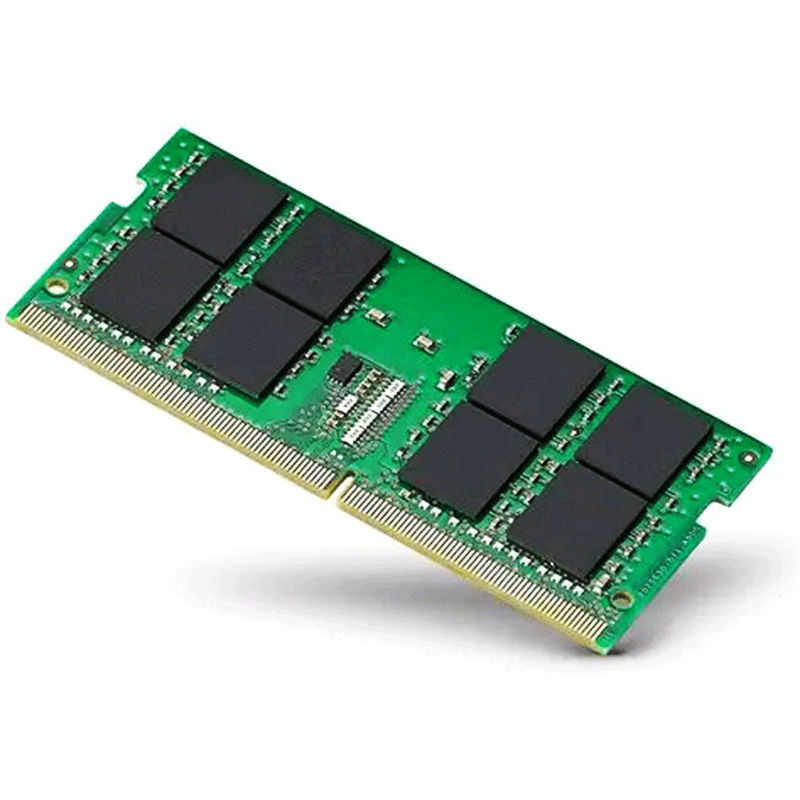
Kingston Branded Memory 16GB DDR4 3200MT/s SODIMM KCP432SD8/16 Notebook Memory
Product Overview
KCP432SD8/16 is Kingston’s branded 16-gigabyte DDR4 memory module operating at 3200 megatransfers per second (MT/s). It is a non-ECC, unbuffered, 260-pin SO-DIMM designed specifically for laptops and compact PCs that use DDR4 RAM. It enhances system speed, multitasking, and responsiveness by expanding available system memory. It offers reliable, energy-efficient operation at 1.2V with CL22 latency and is ideal for smooth multitasking and system responsiveness.
This Kingston 16GB DDR4 3200MT/s SODIMM module delivers fast data transfer rates and stable performance for modern notebooks and small-form-factor systems. Built with Kingston’s quality-tested components, it ensures strong compatibility across a wide range of DDR4-supported devices. Capacity: 16 GB
Key Specifications
- Memory type: DDR4 SDRAM, SO-DIMM, 260-pin
- Speed / Data rate: 3200 MT/s (PC4-25600)
- CAS Latency: CL22
- Voltage: 1.2 V
- ECC / error-checking: Non-ECC, unbuffered (i.e. consumer-grade RAM for notebooks, mini-PCs, AIOs)
- Module layout: 1 × 16 GB (single module)
Key Features
- Capacity: 16 GB — plenty for modern multitasking, productivity, and everyday workloads.
- Memory type: DDR4 SDRAM — a modern standard for performance and efficiency.
- Speed / Data rate: 3200 MT/s (PC4-25600) — fast data transfer rates for responsive system behaviour.
- Form factor: 260-pin SO-DIMM — suitable for laptops, mini-PCs, All-in-One systems and other compact devices.
- Voltage: 1.2 V — energy-efficient operation, which helps reduce power consumption and heat (beneficial for laptops).
- Error checking: Non-ECC, Unbuffered — standard for consumer laptops and notebooks, no server-grade error-correction built in (which is fine for everyday use).
- CAS latency: CL22 — defines the delay between a request and when data is available. A typical latency for this type of module given its speed.
- Compatibility: Designed for notebooks, mini-PCs, All-in-One systems, and other systems that accept DDR4 SO-DIMM modules.
- Single-module layout: 1 × 16 GB — useful if upgrading from a smaller RAM or adding to an existing empty slot.
- Energy efficiency & modern DDR4 advantages: As a DDR4 module, it benefits from the lower power draw and higher density and reliability improvements over older DDR3 memory.
What it’s good for
- It’s designed for laptops, small-form-factor PCs, mini-PCs or all-in-one systems — basically devices that require SO-DIMM instead of desktop-sized DIMMs.
- With 16 GB at 3200 MT/s, it’s a solid upgrade for general computing tasks: multitasking, productivity applications, even light gaming or media editing (assuming other hardware is adequate).
- Because it’s unbuffered and non-ECC, it works well for regular consumer laptops/PCs (not server/enterprise systems).
What to check before buying / using
- Check your laptop’s supported RAM specs — make sure it accepts DDR4 SO-DIMM, 260-pin, and supports 3200 MT/s (or else the RAM may run at a lower speed).
- If your laptop uses 2 memory slots and you want dual-channel operation: better to match modules (same brand, size, speed) — mixing different RAM sometimes works but may limit speed or cause instability.
- CAS latency is CL22; while fine for most use, lower-latency RAM (e.g. CL20 or CL16) would offer slightly better performance — but often with a small practical difference for everyday tasks.
What Kingston is known for / Why many people choose it
- Quality & Reliability — Kingston claims to component-qualify all memory chips and to 100% test each module during production.
- Wide Compatibility — Because Kingston supports so many types of systems and configurations, their modules tend to work reliably across many laptops, desktops, servers, etc.
- Long Experience & Market Presence — Having been around since 1987, Kingston has decades of experience and has built a reputation in the memory/storage market.
- Versatility in Products — Their product lines range from budget-oriented to performance-focused (for gaming, servers, enterprise use).
Ideal Use Cases
- Upgrading a laptop for better multitasking and faster everyday responsiveness
- Running multiple applications at once (browsers, office tools, communication apps) smoothly
- Student or office work: document editing, research, online meetings, cloud apps
- Light to moderate creative tasks — e.g. photo editing, graphic design, light video editing
- Small-form-factor PCs or mini-PCs that require SO-DIMM memory
- Playing entry-/mid-level games or running moderately demanding software (given adequate CPU/GPU)
- Extending the usable life and performance of older laptops or systems


Reviews
There are no reviews yet.