Cisco Series Ip Phone (Power Supply Not Included) CP-7841-K9= 7800
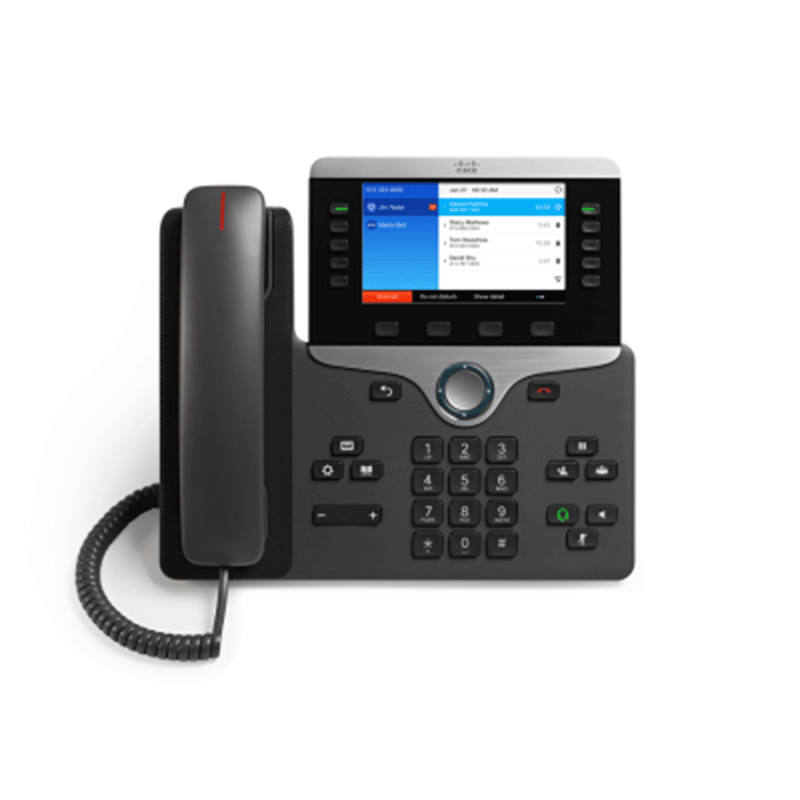
The Cisco CP-7841-K9= is a VoIP (Voice over IP) phone from Cisco’s 7800 Series, designed for businesses to handle voice communications. It supports multiple SIP accounts for efficient call management and features a 3.5-inch greyscale backlit display, Gigabit Ethernet with PoE (Power over Ethernet), wideband audio for clear sound, and dedicated headset and speakerphone functions. The phone is ideal for moderately active users and features programmable line keys for quick access to telephony functions. It works with Cisco’s own call control systems, hosted/third‑party SIP systems, and also in hybrid/cloud‑based deployments (e.g., Webex Calling)
Key Features
- Ergonomic design: The phone offers an easy-to-use interface and provides a traditional telephony-like user experience.
- Graphical display: White backlit, greyscale, 396×162 pixel-based display (3.5″) provides scrollable access to calling features and text-based XML applications.
- Audio Quality: Offers wideband audio and a full-duplex speakerphone for crystal-clear voice quality
- Backlit Indicator: The phone supports backlit indicators for the audio path keys (handset, headset and speakerphone), select key, line keys, and message waiting.
-
Connectivity: Equipped with Gigabit Ethernet ports and supports Power over Ethernet (PoE) for simplified deployment.
- Volume control: A volume-control toggle provides easy decibel-level adjustments of the handset, monitor speaker, and ringer.
- Full duplex speakerphone: Full-duplex speakerphone allows gives you flexibility in placing and receiving calls.
- Replaceable bezel: Phone includes a black bezel. Optional silver bezel is also available separately.
- Dual-position foot stand: The display is easy to view and the buttons and keys are easy to use.
- Wall-mountable: The phone can be installed on a wall using optional wall-mount kit (available separately).
- Electronic hook switch: The hook switch can be controlled electronically with a third party headset connected to the auxiliary port.
Enhanced user experience
Enjoy multiline models for desktops, an endpoint for small conference rooms, and backlit, pixel-based displays. Fixed keys and two-way navigation make it easy to use, and full-duplex communications deliver crystal-clear voice.
High Resolution Display
The Cisco 7841 IP Phone sets a new standard in usability and delivers a context-sensitive user experience. It features a high resolution 3.5″ (396×162) greyscale display, with white backlighting for easy reading. Localised language support, including right-to-left onscreen text, meets the needs of global users.
Simple and secure
The 7800 Series supports the latest encryption to help secure your voice communications. Administration for software updates is simpler, as all models in the series share the same Phone OS. Cisco Expressway enables remote worker single sign-on access through a one-time pin code entry.
Energy efficient
Save energy with low power consumption, recyclable plastics in the hardware design, and the Cisco EnergyWise energy-management architecture. Each phone supports Power-over-Ethernet (PoE) Class 1 and Cisco’s EnergyWise. A standard power-save option reduces power consumption during off-hours, to save money and maximise energy efficiency.
Deployment / Use‑Case Strengths
- More feature‑rich than simpler phones (e.g. 2‑line models): 4 lines + more programmable buttons makes it better for administrative, managerial or front‑desk staff.
- Gigabit Ethernet gives better downstream capacity (e.g. connecting PC through the phone) and helps future‑proofing.
- Wideband audio and higher quality speakerphone make it better for clearer voice calls and hands‑free use.
- Good display for seeing more info, call status, contact list etc.
Use‑Cases & Who It’s for
This phone works well in:
- Offices where staff handle multiple lines or calls (reception, help‑desk, administrative assistants) but do not need advanced hi‑end features.
- Environments migrating from analog or basic phones to IP telephony.
- Organizations that require secure, manageable phones with good audio quality but where budget is still a concern.
- Environments with Power over Ethernet infrastructure, to simplify wiring and reduce need for separate power.
Limitations / Things to Watch Out For
- Monochrome / grayscale display only. No colour.
- Still needs PoE or optional AC adaptor; in environments without PoE, that adds cost.
- Although better than simpler phones, for very heavy call volumes or many concurrent calls, you might need phones with more line keys or different features.
- Firmware compatibility: ensure the firmware image matches your call control system (e.g. CUCM, Webex, third‑party SIP) and supports needed features.
Accessories / Things to Get Alongside
- PoE switch or injectors (if your Ethernet infrastructure doesn’t support PoE to each desk).
- AC power adapter (e.g. CP‑PWR‑CUBE‑3= or equivalent) for non‑PoE setups.
- Headset (RJ‑9) for hands‑free work.
- Wall mount kit if needed.
- Replaceable bezels (some sellers offer silver/charcoal frame options) for aesthetics.
Keys
◦ Line keys
◦ Soft-keys
◦ Two-way navigation and select keys
◦ Hold/Resume, Transfer and Conference keys
◦ Messaging, Service and Directory keys
◦ Standard key pads
◦ Volume control toggle key
◦ Speakerphone, headset and mute keys


Reviews
There are no reviews yet.